A universal remote on a Cardputer, built with Claude in a few hours of my weekend
Our living room ran on a Logitech Harmony 555, and the website it needs to be reprogrammed is gone. So I replaced it with a pocket computer, its infrared LED and about 2,300 lines of code I mostly didn't type. Both interfaces are in this page: try them.
What it does
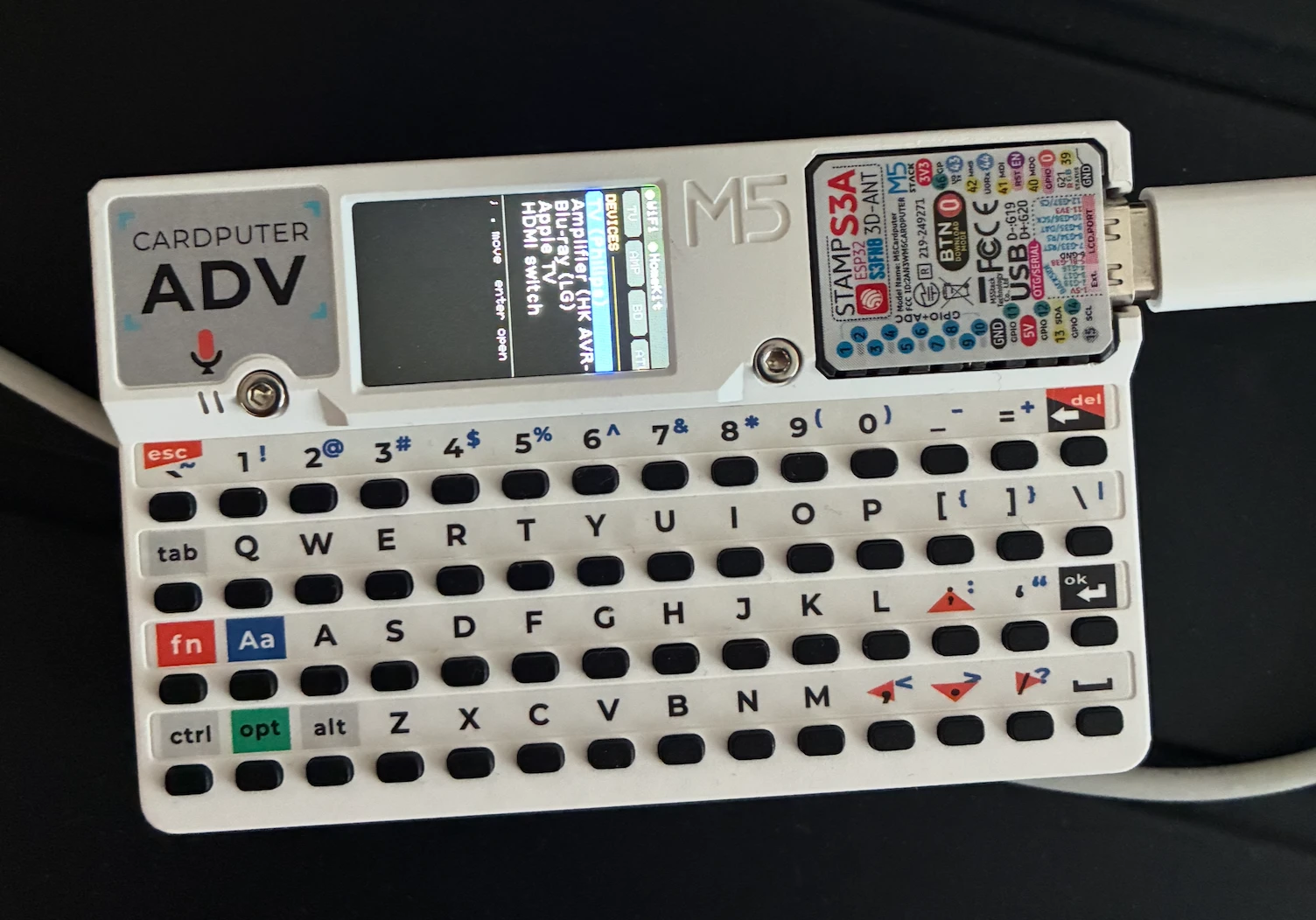
The M5Stack Cardputer ADV is an ESP32-S3 with a tiny keyboard, a 240 × 135 screen, Wi-Fi and an infrared LED. Ours drives five devices that only understand infrared: a Philips TV, a Harman Kardon amplifier, an LG Blu-ray player, an Apple TV and a no-name HDMI switch.
Like the Harmony, it works with activities. “Film · DVD” switches the TV, the amp and the player on, picks the right input on the amp and on the HDMI switch, switches off what isn't needed, then sends the arrow keys to the player. There are seven of them, plus “all off”. We reach them three ways:
- The Cardputer itself, with its keyboard and screen.
- Apple Home: it shows up as a TV named “Salon” whose inputs are the activities, so the Home app, the Control Center remote and Siri all work.
- A phone page served by the Cardputer, saved to the iPhone home screen like an app.
Infrared goes one way: the remote never knows whether the TV really switched on. So it remembers what it believes each device is doing, and has a “Fix” flow for when belief and reality drift apart: say what's wrong (“the TV is off”), it re-sends what's needed and asks if that worked.
Try the Cardputer
This is the on-device interface, running the same activity logic against a simulated living room. Click the screen and use your keyboard, or the keys under it. Start with Film, then press Space for the menu. The panels show what the remote thinks against what the devices really do; use “Other remote” to make them disagree, then press f to fix it.
Try the phone remote
This is the exact page the Cardputer serves, talking to a simulated Cardputer instead of the real one. The page is in French, as at home.
Put it in a state
- With everything off, the first tab offers the activities. Start one: the status icons light up as each code goes out, at the pace of the real devices (the amplifier needs three seconds before it listens).
- Once an activity runs, the tab becomes the remote. Volume always goes to the amplifier; hold a volume key to repeat.
- Appareils has every single command of every device. Dépannage is the Fix flow.
The whole page is one file, 10 KB once compressed, with no framework and no external request. It has to be: the web server is a microcontroller with about 120 KB of free memory that is also busy being a HomeKit accessory.
A few hours, spread over a weekend
I had talked the idea through with Claude over ten days, on and off: which hardware, how HomeKit models a TV, where infrared codes come from. The first firmware compiled on Saturday 21 November. By Sunday night the Cardputer was paired with Apple Home, every code was verified on the real devices, the Fix flow worked and the phone page was on my home screen. A last sitting on Monday evening went into its design.
I did not spend the weekend on it. It took a few hours of my time in all, in short sittings, with the rest of the weekend going on around them. Claude worked; I came back when there was something to look at.
Most of those hours went into testing, because infrared is the one place where Claude could not check its own work. It can compile, flash the Cardputer and question it over Wi-Fi, but it cannot see whether the TV came on: the signal goes one way and the board has no receiver. So at every stage, each code and each activity needed me in front of the devices, pressing a key and reporting what happened.
I'm a software engineer, but microcontrollers, USB protocols and infrared timings are not my daily work. Alone, in spare evenings, I would have counted this project in weeks. None of the walls below is hard for someone who already knows the terrain. The point is that there are six different terrains.
Where the weeks would have gone
- Knowing the board before touching it
The Cardputer has an infrared emitter and no receiver, so it can't learn codes. Its LED sits on the pin the serial port normally uses. The screen rotation that every tutorial gives is for the previous model. I learned all three from Claude reading the documentation, not from an evening of wondering why nothing happens.
- Speaking HomeKit
The obvious design, a bridge exposing each device, is buggy for TVs since iOS 17 and limited to one TV. We went for a single “Television” accessory whose inputs are the activities. That is a decision you normally reach after building the wrong thing first.
- Finding the codes
Codes for four devices came from the community's Flipper-IRDB: the exact file for some, a sibling model for our old TV. Claude looked them up and wrote the table; I sat in front of the devices and said which keys did something. The ones that did nothing were dropped.
- The HDMI switch nobody documented
We found no code for it anywhere online, and guessing failed. I still had a USB infrared receiver from years ago, the kind made for Windows Media Center PCs. macOS has no driver for it. Claude wrote one in Python, in user space, following the protocol of the Linux driver, plus the decoder for the signal. I plugged the dongle in, pressed the buttons of the switch's remote, and had my codes. That detour alone was a project.
- Bugs with no error message
Apple Home kept showing “No response”: the Wi-Fi chip was napping between packets and dropping 40% of pings. The interface froze at random: logging over USB blocks when nobody is listening. Safari stalled the page: it keeps idle spare connections open, which starves a single-threaded web server. Each has a one-line fix that takes days to find when you don't know where to look.
- Making a phone page feel native
On the iPhone the top of the page was blurred. We reproduced it in the iOS simulator and found that iOS colours the status bar from the page's plain background colour; ours only had a gradient. One CSS line.
What I enjoyed most
Two things, and neither is the code.
Getting something to work, quickly. The first firmware compiled on Saturday; on Sunday the living room answered. A side project usually dies in the gap between the idea and the first thing that works, because that gap is filled with setup, documentation and dead ends. Here it was short enough that I never lost interest, and from then on every sitting went into something I could see.
Iterating on the experience and polishing the interface. Once it worked, I could spend my time on what it is like to use: which screen comes first, how many taps to switch activity, what the remote should say when the TV didn't obey. And then on how it looks. I never had to imagine anything. Claude first built the two mocks you tried above: the real code, wired to a fake living room. Every idea was judged on a screen that behaves, not on a description.
For the phone page I asked for options. I got a board with five versions of the real page side by side, all driven by the same simulated Cardputer, each with its cost in bytes for the microcontroller. I picked a palette from one, the gradient from another, the edge-to-edge rows from a third, and the next minute I was looking at the mix. The rest was sentences like “double the space between the wheel and the row under it”, then a new icon the same way.
That loop is the real change. It isn't that the code gets typed faster. It's that the distance between having an opinion and seeing it running dropped from a day to a minute, so I gave many more opinions. Polish stopped being the thing you skip on a side project and became the fun part.
Who did what
Claude read the documentation, wrote the firmware, the driver, the page and the mocks, compiled, flashed the Cardputer over USB, queried it over Wi-Fi to check its own work, and kept the specs up to date. I chose what to build, decided every time there was a choice, and was its eyes in the living room: whatever a camera or a receiver would have told it, I had to tell it. That is where a human was still the slow part, and the necessary one.
It isn't finished. A few HomeKit paths are still untested, the phone page is open to anyone on our Wi-Fi, and the clip-on pod with four stronger LEDs, for more range, only exists as a schematic and a parts list. But it switches the living room on.